
If you tried doing anything creative on the computer, chances are you have come across them: Colors denoted by hexadecimal codes like #ff6087 or #54e999.
Though there are web-based and other tools that can help you to find the right code, using these can slow you down. With a bit of simple math, you'll be able to approximate color codes and insert them into your projects, or to edit an existing color code to shift it in the right direction.
The first thing to know is that these 6-digit codes are nothing more than red, green and blue values (RGB). The first two digits tell us how much red there is in the color. The two middle digits are the amount of green, and the last digits are the amount of blue.
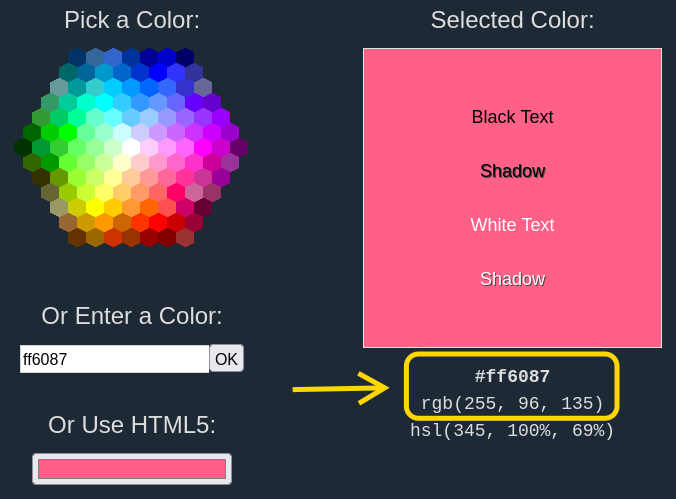
Let us continue with #ff6087 as our example. The following graphic shows this color in decimal and hexadecimal notation.
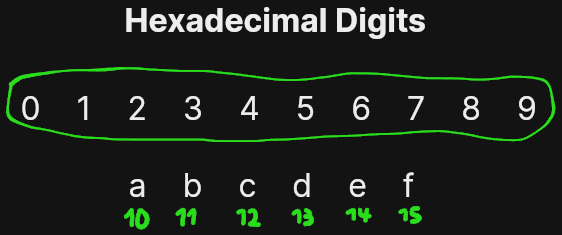
At first, it may be confusing to see letters in the color code. There is a very easy way in which these letters function as numbers. The only letters that are used are a-f. The letter "a" is assigned a value of 10, "b" is assigned a value of 11, and so on until 15 ("f"). In essence, there letters extend our normal (decimal) numbering system right where it stops - giving us single digit representations for the numbers 10 to 15.
Once we identify the values behind the digits in our color code, we can do the simple maths to convert our hexadecimal code into a more readable, decimal RGB format.
Looking at #ff6087 again, remember that the first two digits are the amount of red in our color. You always need to multiply the first of the digits by 16. Then, you multiply the second digit by 1 and add the two results together. This will give us a red value of 255 (15 x 16 + 15 x 1). See if you can follow the math in the following graphic with the information that I provided until now!
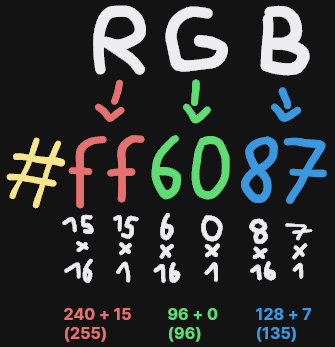
Here we go! After doing the same maths for the green and blue values, we arrive at our more readable, decimal RGB value.
Multiplying by 16 and 1 may seem somewhat arbitrary, but the logic behind it is very simple. Remember that we are dealing with the hexadecimal system, which is the base-16-system. It gives us 16 digits, including zero. It makes us calculate with 16 and its multiples, just like the decimal system makes us calculate with 10 and its multiples. Our normal number 22 is nothing more than "2 x 10 + 2 x 1", if you break it down in the same way.
When you come across hex colors the next time, you can try to do some maths on them. And you can modify them by increasing or decreasing the red, green and blue values. The higher the values are, the brighter the color will also be. And vice versa. Also, you can use this knowledge to quickly come up with an approximate color code to quickly insert into one of your projects. You can start with a guess and fine-tune the value until you have what you are looking for.
Who came up with this system and why is it so widespread? Perhaps it has to do with the fact that 255 is the maximum number that can be represented by a single byte (11111111). Since any byte can be contained within just two hexadecimal digits, the resulting color codes are short and compact.